

Dominate
every wipe with the RustSurvivor Rust+ Discord bot and raid alerts
RustSurvivor stays connected to your Rust+ server when you log off. Raid alarms reach Discord, team chat and Telegram. See your team on a live map and share it with friends by link, track enemy clans and run your whole server from Discord.
24 h free trial, no card needed. Then Pro is $6/month or $48/year.
Live: real commands, answered by the bot.
F0Everything it does
One bot for the whole wipe
Alerts, map, intel, Discord and base control in one place. Tap a card to jump to it.
Alerts
Raid alarms that actually wake you up.
- Discord #alerts with @everyone
- In-game team or clan chat
- Telegram: loud alerts that repeat until someone answers
- Raid popup and siren on the live panel
- Online raid mode: Discord → Telegram
- One 🚨 Smart Alarm card, !alarms in game
Map & panel
Your whole server in one tab.
- Live team map with your base zone
- Death log with killer and grid
- Map notes and farm routes: edit, hide, Undo
- Share the live map by link, no account
- Live view of your own cameras, turrets and drones
- Team status: online, dead, AFK
Intel
Know who is on and when to hit.
- 40 tracked players, online/offline alerts
- Clan radar: “ABC 4/6 online”
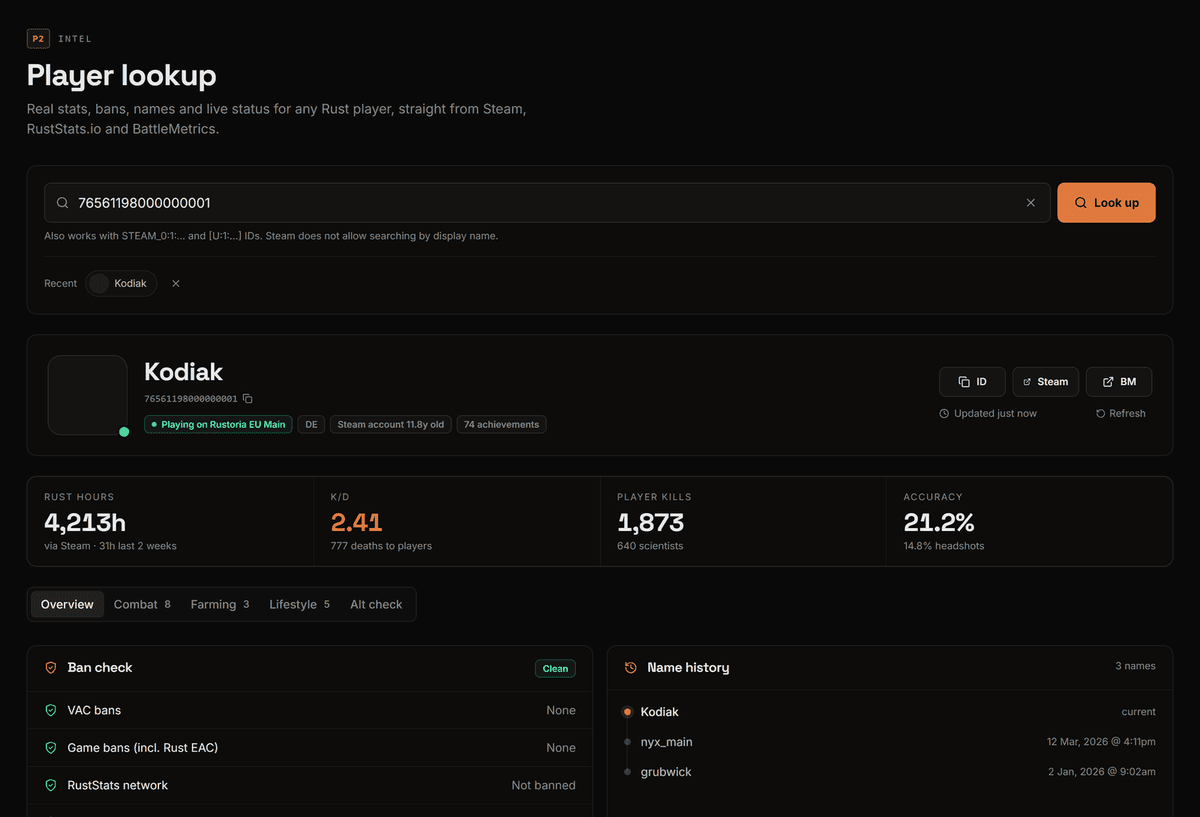
- Player lookup with threat rating
- Raid times: busiest and quietest hours
- Team stats without AFK time
Wipe tools
Close out one wipe, find the next.
- Wipe recap card of your team
- Auto-posted when the server wipes
- Download it or share a link
- Fresh map: notes and routes reset on wipe
- Wipe calendar: every server’s next wipe
Discord bot
One /install, your server in Discord.
- 8 channels, from #servers to #settings
- Live server cards
- Two-way team and clan chat
- Every setting in #settings
- Channels that repair themselves
Base control
Flip switches from anywhere.
- Smart switches, alarms, storage monitors
- Tool Cupboard upkeep time left
- Workflows on a timer or when teammates are near
- Oil Rig crate timer
Teams
Built for the whole squad.
- One bot voice per team
- Team link button: share data only if you both agree
- Manager or Viewer access for teammates
- Team chat commands like !pop and !team
RustSurvivor AI
A Rust expert in your chat.
- !ai in game, /ai in Discord
- Ask AI on the dashboard
- Answers only from real data, never made up
- Translate team chat both ways: auto-translate and !tr
Free tools
Free for every player, no account.
- Raid and recycler calculators
- Plant and animal genetics
- Electricity planner
- Console commands and wipe calendar
- SmartIntel browser extension
A1How it works
Set up in about 5 minutes
- 1
Sign in and pair
Sign in with Steam, add the RustSurvivor extension once to link Rust+, then in game press Esc → Rust+ → Pair Server. Pair your switches and alarms the same way.
- 2
Add the Discord bot
Run /install in your Discord server. The bot creates its channels for every server you pair. Prefer the browser? The dashboard works without it.
- 3
Get alerted anywhere
Raids, deaths, tracked players and upkeep reach Discord, team chat, Telegram and the website, even while your PC is off.
G12Alerts everywhere
Wake up before the doors go
Wire a Smart Alarm to a sensor in your base and every raid reaches you four ways: Discord, in game, Telegram and the dashboard.
Discord
Every Smart Alarm pings @everyone (or @here) in #alerts with its in-game details, and can be read aloud with Discord TTS. Tracker and activity alerts get their own channels.
In game
The bot posts the alarm in team or clan chat, so whoever is online sees it right away.
Telegram
Loud alerts with a raid alarm sound that repeat until someone answers “I’m on it”. Works in groups too. Pro and the open beta.
Website
A raid popup with a siren (or a sound you pick per alarm) on the live panel. I’m on it stops it for the whole team, and the raid shows up in the server’s Raid alerts feed.
Online raid mode
Nobody online? We wake you up.
When your alarms keep going off and nobody on the team is online, the alert moves from Discord to Telegram until someone reacts. It stops as soon as a teammate comes online.
Step 1
Discord
The normal alert goes out in #alerts.
Step 2
Telegram
Still going off? A loud Telegram alert that repeats until someone answers, plus a last Discord ping.
03:14
Tuesday, wipe day 3
Telegramnow
ONLINE RAID: Main base
Alarms going off for 6 min, nobody online. Tap I’m on it to stop the alerts.
Discord7m ago
#alerts
@everyone Smart Alarm: Main base
Smart Alarm card
Every setting in one card
Settings → 🚨 Smart Alarm: switch in game, Discord (ping @here or @everyone, read aloud), Telegram and the website popup with its sound on or off, plus online raid mode. Same group in #settings.
Rename and Test
Give each alarm its own name and message, then press Test to check every place it reaches.
!alarms in game
!alarms lists your alarms, going off or quiet, and when each last went off. !alarm <name> shows one.
K4Live map & panel
Your whole server in one tab
Open a server’s live panel on your phone mid-raid or on a second screen while you play.


 FERRY TERMINAL
 TRAIN TUNNEL
 HARBORTRAIN TUNNEL
 HARBORTRAIN TUNNEL
 LARGE FISHING VILLAGE
 FISHING VILLAGEFISHING VILLAGE
 ABANDONED MILITARY BASE
 ARCTIC RESEARCH BASE
 GIANT EXCAVATOR PITTRAIN TUNNEL
 MISSILE SILO
 LAUNCH SITETRAIN TUNNEL
 RANCH
RANCH THE DOME
 AIRFIELDTRAIN TUNNEL
 TRAIN TUNNELMILITARY TUNNELTRAIN TUNNEL
 LARGE BARN
 WATER TREATMENT PLANTTRAIN TUNNEL
 OUTPOSTTRAIN TUNNEL
 TRAIN YARDTRAIN TUNNEL
 JUNKYARD
 POWER PLANTTRAIN TUNNEL
 SATELLITE DISH
 SULFUR QUARRY
 SEWER BRANCH
 HQM QUARRY
 STONE QUARRYTRAIN TUNNELTRAIN TUNNELTRAIN TUNNELTRAIN TUNNELTRAIN TUNNELTRAIN TUNNELTRAIN TUNNELTRAIN TUNNELTRAIN TUNNEL LINKTRAIN TUNNEL LINK
 TRAIN TUNNEL
 TRAIN TUNNELMINING OUTPOSTMINING OUTPOST
 ABANDONED SUPERMARKETABANDONED SUPERMARKET
 OXUM'S GAS STATIONOXUM'S GAS STATIONMINING OUTPOSTABANDONED SUPERMARKETOXUM'S GAS STATION
 LARGE OIL RIG
 SMALL OIL RIG
 LIGHTHOUSELIGHTHOUSE
 UNDERWATER LAB
 CARGO SHIP
 Raid target · H14
 Juno · 4m agoMMiraKKaiRRook
- Mira OnlineO24 · home
- Kai OnlineQ25 · home
- Rook AFK 12mU14 · 1.79km from base
- Juno DeadO18 · 4m ago
Live map
Your teammates, monuments and base zone with HOME / AWAY tags, updated live. It never shows enemy players.
Death markers
Each dead teammate shows a death marker on the map. Hover it to see when they died.
Death log
Who killed you, with their Steam profile, or what did: bear, scientist, turret, fall, cold. With the exact place, like “Near Junkyard · I26”.
Map notes
Drop typed notes (enemy base, team alliance, raid target, stash, loot, trap) with author and time, shared with your team. Link players to a note in one click from the Players tab; its pin shows a 👤 count.
Farm routes
Draw named, coloured routes; the length, sprint and walk time show as you draw. Edit path drags any point later.
Easy edit
Tap a note or route for Edit, Hide and Delete, or Move a note. Select several to delete at once, with about 6 seconds to Undo.
Fresh map every wipe
On a real server wipe, last wipe’s notes and farm routes clear by themselves. Trackers, settings and Discord stay.
Map layers
Card readers, keycard spawns and a death heatmap, one click each.
CCTV live view
Watch and control your own cameras, turrets and drones from the browser, by the ID you set on them in game.
Team status
Who is online, dead, AFK or offline, with grid, distance from base, time alive and session length.
Share map
Friends watch your map live, no account
Send one link. Pick when it expires and close it any time: viewers are disconnected at once. Up to 10 open links per server on Pro, 5 on Beta, 2 on the free trial.
Live, and they can draw
Team positions (only if you switch them on), map notes, farm routes and monuments, live. Friends can draw lines, arrows and pins with you.
Show link, New link
Show link brings the address and its QR code back any time. New link gives a leaked link a new address and disconnects the old one.
Share to
Ready messages for Discord, Steam, WhatsApp, Telegram and X.
Players on notes
Players you linked to a note show on its card. Tap one to open their BattleMetrics page.
P2Intel
Know when to hit
See who is online around you, which clans are awake and when your server goes quiet.
Player trackers
Track up to 40 players (10 on the free trial, 20 on Beta). Alerts in game, in #tracker and on Telegram when they log on or off, plus the best time to hunt them.
Clan radar
Tracked players grouped by clan tag, like “ABC 4/6 online”. Get alerted when a clan starts logging on, or when they all go offline: a raid window.
Player lookup
Hours, K/D, bans, name history and a threat rating with reasons for any player. Compare two players and check for alts.
Raid times
The busiest and quietest hours on each server from 4 weeks of player history, in your time zone, plus how wipe day changes it.
Team stats
Real play time without AFK, deaths, leaderboards, your next online window and an AI summary of the verified numbers.
ABC4/6 onlineMostly online
XYZ1/5 onlineMostly offline
DEF0/3 onlineAll offline: raid window
- Clan ABC is logging on: 4/6 online
- Clan DEF is all offline (0/3) for 15 min
W1Wipe tools
Every wipe, in one card
When the server wipes, your team gets a recap of the whole run. Then find the next fresh wipe.
Wipe recap card
Playtime, deaths, raids, top killers and awards: Most time online, Most deaths, Longest life, Most raids answered.
Posted for you
It lands in #activity when the wipe is detected. Download it or share a link with the team.
Wipe calendar
Every busy server’s last and next wipe, players and queue, with a force wipe countdown. Filter by group limit, rate and schedule, follow a server for a wipe reminder. Free for everyone.
Wipe recap
Sample server · 14 days
- Playtime
- 186h
- Deaths
- 132
- Raids
- 7
- Team
- 4
- Most time onlineMira61h
- Most deathsKai48 deaths
- Longest lifeRook9h 12m
- Most raids answeredJuno5 raids
Top cause of death: scientists, 19 times
D7Discord bot
Your server, inside Discord
One command sets up everything. Your team can follow the server without opening the game.
⌄ RustSurvivor · your server
- serversLive card per server: players, team, map
- team-chatIn-game team chat, both ways
- clan-chatYour clan and its chat, both ways
- switchesOn/off buttons for every switch
- activityJoins, deaths and device events
- trackerLive list of tracked players
- alertsRaid alarms with @everyone@3
- settingsEvery setting, from Discord
One install
/install creates private channels for every server you pair, with an optional access role.
Live cards
Server cards with your team roster, status and map update by themselves.
Two-way chat
Write in #team-chat or #clan-chat and it is sent to that chat in game.
#settings
Change every setting with buttons, menus and forms, synced with the website.
Self-repairing
Deleted channels come back with their name, permissions and position, and live cards are posted again.
/clear
Clears the chat in a RustSurvivor channel and keeps the live cards.
E5Smart devices & automations
Run your base from anywhere
Your paired switches, Smart Alarms and Tool Cupboard, exactly as they look in the dashboard. Trigger the alarm or flip a switch to try it.
Switches, alarms, storage
Control Smart Switches from the browser, Discord or !turrets on in game. Storage monitors show what is inside and how long each Tool Cupboard has left.
Workflows
No-code rules: an alarm, a switch, a time of day, in-game night or a teammate near a place triggers switches, groups, Discord or team chat messages.
Oil Rig crate timer
Wire an RF Receiver to a Smart Alarm and get a 15-minute crate countdown in chat and Discord, with warnings at 10 and 5. Never a false raid alert.
S3Teams
Built for the whole squad
Everyone sees the same base, and nothing is shared without consent.
One bot voice per team
Two RustSurvivor users in one team? Only one answers in team chat. Pick who speaks with the Team link button on the server page.
Team link
Share trackers, map notes, timers and devices with a teammate, only if you both agree. One Team link button in the server header shows the status and every setting. Unlink any time.
Team sharing
Give teammates Manager or Viewer access to a server. Managers flip switches, Viewers just watch.
Team chat commands
!pop, !team, !time, !online and more for the whole squad, right in game.
H9RustSurvivor AI
A Rust expert on your team
Type !ai in team chat, /ai in Discord, or use Ask AI on the dashboard. It answers only from real Rust data and RustSurvivor’s own guides, never made up, and runs on our own server.
Real answers only
A question it was not taught gets a short “I don’t have that one yet” and a link to the docs, not a guess. Help tickets get an instant answer from the same guides.
Chat translate, both ways
Turn on Auto-translate, pick one of 20 languages, and every new team and clan chat line from others is translated live by Google Translate or DeepL, with the original kept above. Write back in their language with Send in… next to Send or!tr de <text> in game. Discord messages translate too.
!ai how many rockets for an armored door
Armored Door needs 5 Rockets (7000 sulfur).
!ai how many c4 for a stone wall
Stone Wall needs 2 C4 (4400 sulfur).
!ai raid cost of a garage door
Garage Door: 2 C4 (4400 sulfur), 3 Rockets (4200 sulfur), 9 Satchel Charges (4320 sulfur), 150 Explosive Ammo (3750 sulfur).
T0Free for everyone
Free Rust tools
Six tools on real game data. No account, no trial, just open one.
- Raid calculatorSulfur, explosives and eco raid costs for every wall, door and deployable.
- Recycler calculatorWhat your loot recycles into, scrap totals and recycle time.
- Genetics calculatorPlant crossbreeding into GGGYYY, plus cow and sheep breeding odds.
- Electricity plannerBuild and simulate Rust circuits: solar, wind, batteries, logic and turrets.
- Console commandsF1 console commands, admin commands, a keybind builder and FPS profiles.
- Wipe calendarEvery busy Rust server: last and next wipe, players, queue and group limit.
- All tools
P1Pricing
Simple pricing
Every paid plan includes all Pro features. Prices are in USD and exclude sales tax/VAT, which is added at checkout based on your country. Subscriptions renew automatically until cancelled; if you cancel, Pro stays active until the end of the period you paid for.
Invite friends: coming soon
Invite friends and you both get 3 days of Pro.
Pro includes
- Always-online bot that stays connected when you log off
- Raid alerts to Discord, in game, the website and Telegram with a loud alarm sound
- Online raid mode when nobody on the team is online
- Smart switch, alarm and storage monitor control, workflows
- Live map, map notes, farm routes, team status and death log
- Share your live map by link: 10 open links per server
- Track 40 players (trial: 10), clan radar and raid times
- Player lookup with threat rating and team stats
- Discord bot with live cards, two-way chat and #settings
- Team-chat commands (!pop, !team, !time, !alarms…)
- Team sharing for dashboard access
- RustSurvivor AI: 100 questions a day in game, Discord and the dashboard
- Chat auto-translate into 20 languages
Payments are processed securely by our payment provider. See the Terms of Service for our refund policy. Questions? contact@rustsurvivor.com
M15FAQ
Questions, answered
Setup, team access, wipes and what Rust+ can and can't see.
RustSurvivor (sometimes written Rust Survivor) is a Rust+ (Rust Plus) bot and Discord bot for the game Rust. It stays connected to your server through the official Rust+ companion feature and sends raid alarms, team chat and tracked players to Discord, Telegram and your browser, even while you are offline. The Rust tools at rustsurvivor.com/tools are free for everyone.
Sign in with Steam at rustsurvivor.com/start, add the RustSurvivor extension once to link Rust+, then pair your server in game (Esc → Rust+ → Pair Server). Add the Discord bot with /install if you want it. A short guided tour (shown once, replay it from the tour button at the top right) and a "Get set up" checklist in the dashboard walk you through every step. It takes about 5 minutes and the first 24 hours are free, no card needed.
No. RustSurvivor runs in the cloud 24/7, so your dashboard stays connected and sends alerts even when your PC is off. Just open the browser dashboard anytime to check in.
Yes. The dashboard and live server panel work in any browser on your phone, tablet or PC. No app install needed.
Link the RustSurvivor Telegram bot: open the Telegram bot tab in the dashboard (rustsurvivor.com/app?tab=telegram, or the Connect apps tab on a server page), tap Open Telegram and press Start. Raid alarms, deaths, tracked players, upkeep and wipes then reach your phone, even with the game closed. Raid alarms repeat every minute until someone taps I’m on it, and Send alarm sound gives you a loud raid alarm tone to set as the chat’s sound. Telegram is part of Pro and the open beta. With Pro you can also turn on a real phone call in Online raid mode: when alarms keep going off, nobody is online and nobody answers on Telegram, RustSurvivor calls your verified number (press 1 if you are on it). The Discord bot works on your phone too, through the Discord app.
Yes, with Pro or the open beta. In Settings, card API & Home Assistant, create a personal API token and press Copy Home Assistant config: it gives you ready-made Home Assistant switches for your smart switches, with the token kept in secrets.yaml. Add a webhook URL to get smart alarms, online raids, teammate and tracker events, switch changes, timers and wipes as signed JSON in Home Assistant, IFTTT or any https endpoint. Alexa and Google work through Home Assistant, and Stream Deck through an HTTP request plugin or the Home Assistant plugin. Up to 5 tokens and 5 webhooks per account; revoke a token any time.
If your raid alarms keep going off and nobody on your team is online, RustSurvivor steps up the alerts: first the raid alert in #alerts, then a loud Telegram alert that repeats until someone taps I’m on it (Telegram is part of Pro and the open beta), plus a last @everyone ping. It stops as soon as someone comes online or the alarms go quiet. Change the timings in Settings → 🚨 Smart Alarm or in the 🚨 Smart Alarm group of #settings.
Yes. Settings → ✏️ Alert messages lets you rewrite the smart alarm, online raid, teammate online / offline / died, timer finished and reminder, and TC decay alerts with placeholders like {name}, {grid}, {server} and {time}, with a live preview and Reset to default. The text is used in team chat and in the Discord alert, for all servers or one server. Up to 200 characters and no @everyone or mentions. Telegram keeps its own cards.
All in one card: Settings → 🚨 Smart Alarm (also in a server’s Settings and the 🚨 Smart Alarm group of #settings in Discord). Switch each place on or off: in game, Discord (ping None, @here or @everyone, and an optional read-aloud TTS alert), Telegram and the website popup with its alarm sound (the siren, or Klaxon, Triple beep, Rising sweep, Buzzer or Chime, with loop and volume). Online raid mode is there too, and every paired alarm has Rename (name and message), its own Sound and Test. In game, !alarms lists your alarms and !alarm <name> shows one.
Yes. Team chat commands are available to your squad, and Discord access can be shared with the people you want on the server.
Smart devices reset on a wipe. If the server shows offline, pair it again in game, then pair your devices. A wipe brings a new map, so when RustSurvivor sees a real wipe it clears last wipe’s map notes, farm routes, teammate trails and shared-map drawings by itself. Your trackers, settings, Discord and Telegram setup and shared map links stay, and Team Stats history carries over.
Yes, the open beta is free for everyone. Sign in with Steam, connect Discord at rustsurvivor.com/connect-discord, then open a Beta access ticket in the RustSurvivor Discord with your SteamID64 or Steam profile link. The bot checks the link and turns Beta on: every Pro feature with about half of Pro’s limits: 20 tracked players, 50 AI questions a day and 5 shared map links per server.
The free trial tracks 10 players at once, Beta 20 and Pro 40, across all your servers. Paste a BattleMetrics link in the Trackers tab or use /tracker add in Discord; you get an alert in game and in #tracker when they come online or go offline.
Tag your tracked players with their clan and RustSurvivor counts each clan for you, like “ABC 4/6 online”, on the Trackers page, the server panel, #tracker and in game with !clans. You get an alert when a clan starts logging on together, and when the whole clan has been offline for a while: a raid window.
At the end of every wipe RustSurvivor makes a recap card of your team: playtime, deaths, raids, top killers and awards like Most time online and Longest life. It is posted in #activity when the wipe is detected, and you can download it or share a link from Team stats.
Yes. Press Share map on the live map and send the link: friends open your live map with no account, with your map notes and farm routes, and your team’s positions only if you switch that on. With "Friends can draw too" they can draw lines, arrows and pins that everyone on the link sees live. Pick when it expires (24 hours, 7 days, 30 days, at the wipe or never) and whether monuments show as icons or names, and close it any time; viewers are disconnected at once. Show link brings the address and QR back any time, New link gives a leaked link a new address, Share to gives ready messages for Discord, Steam, WhatsApp, Telegram and X, and there is no limit on viewers. Players linked to a note show on its card and open their BattleMetrics page. Open links per server: Pro 10, Beta 5, free trial 2.
Yes. In the Players tab press the pin button next to a player and tap a note: they are linked at once, with Undo, and tapping a ticked note removes them. The note card lists its players with online or offline when known, and Edit there adds or removes players. Up to 20 per note. Friends on a shared map link that shows notes see the names, live, and can tap one to open their BattleMetrics page (or Steam profile when there is none).
Yes, on Pro and Beta. On the live map open Map layers, then Trails: a coloured line per teammate for the last hour, 6 hours, day or the whole wipe, a "Where we’ve been" heatmap, and Replay to watch the team move at ×10, ×60 or ×600. Only your own team is recorded, for the current wipe only, and only you and your Team Sharing members can see it.
Tap it on the map: the card has Edit, Hide and Delete (notes can also Move, routes can Edit path to drag their points). The notes list and Map layers > Farm routes have an eye, a pencil and a bin on every row, plus Hide all / Show all and Select to delete several. Hiding is only on your map; deleting asks first and gives you about 6 seconds to Undo.
No. Only one bot speaks in team chat per team; pick who speaks with the Team link button in the server page header (also in Dashboard → Servers → Team link). With Team link you can also share trackers, map notes, timers and devices with that teammate, only if you both agree, and unlink any time.
Yes. The raid and recycler calculators, the genetics calculator for plants and for cows and sheep, the electricity planner, console commands and the wipe calendar are free for everyone at rustsurvivor.com/tools, no account needed.
Yes, three ways. Scan from a screenshot reads a picture you paste. Scan with your phone camera: point your phone at the monitor showing the genes, line them up in the box, capture, then check and fix the genes before adding. Scan Rust (Chrome, Edge or Firefox on a computer) shares the Rust window with the page and adds each seed or clone as you click it in your inventory or look at a planted plant; use fullscreen 16:9, UI scale 1.00 and Windows HDR off. All of them read the genes on your own device; nothing is uploaded or recorded.
Rust stopped sending vending machine and event map markers (cargo ship, patrol heli, travelling vendor, oil rig crates) to Rust+, so no Rust+ tool can see them any more. For Oil Rig, wire an RF Receiver to a Smart Alarm and use the Oil Rig crate timer.
An assistant you can ask in team chat (!ai), in Discord (/ai) or on the dashboard. It answers only from real Rust data and RustSurvivor’s own guides, never made up: a question it was not taught gets a short “I don’t have that one yet” with a link to the docs. It runs on our own server, so your questions are not sent to another AI company, and help tickets get an instant answer from the same guides. On the website you can also ask by voice (tap or hold the mic, or hold Space) and have answers read aloud; speech is handled by your browser and RustSurvivor never receives audio. Pro includes 100 questions a day, Beta 50 and the free trial 20.
Yes. #team-chat shows your in-game team chat live and #clan-chat your clan chat, and anything you write there is sent to that chat in game.
Yes. Turn on Auto-translate above the chat on the website and pick one of 20 languages: every new team and clan chat line from other players is translated live by Google Translate or DeepL, with the original kept above. In Discord, use Apps → Translate on a message or /translate. Translating does not use up your AI questions.
A free browser extension for Chrome and Firefox. On BattleMetrics player pages it shows true total hours, other names used and ban flags, with a 14-day activity chart, and it adds Steam data on Steam profiles. Get it at rustsurvivor.com/smartintel.
Invites are coming soon: invite friends and you both get 3 days of Pro. Until then, every account can try full Pro free for 24 hours, no card needed.
Yes. Authentication is handled through official Steam and Discord flows, and sensitive data is protected with standard security practices.